| Importing Clients' Information |
|
Before importing your clients into Client Track, you must export your clients' information
first from one of the software packages listed on the left side of the menu. |
|
| Follow the instructions below on how to export your clients' information into a text/CSV file. |
|
|
|
| Exporting Clients From MS Outlook |
|
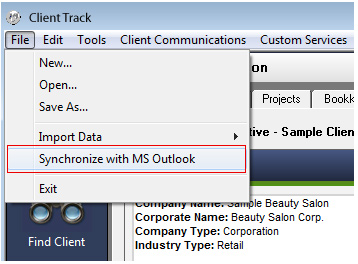
| STEP 1 |
|
 |
|
| From the main menu in Client Track, go to 'File' > . |
|
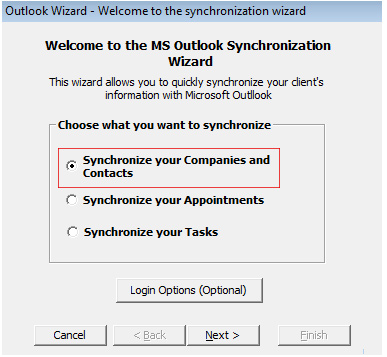
| STEP 2 |
|
 |
|
| Select and click .. |
|
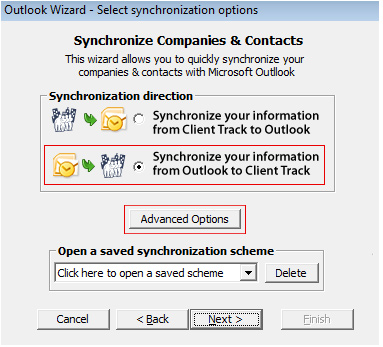
| STEP 3 |
|
 |
|
| 1) Select (2nd option). |
|
| 2) Click . |
|
| STEP 4 |
|
 |
|
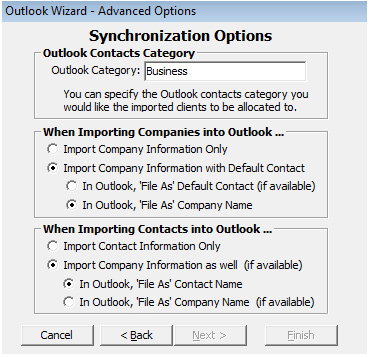
| Select the settings you want when importing contacts and click . |
|
| STEP 5 |
|
 |
|
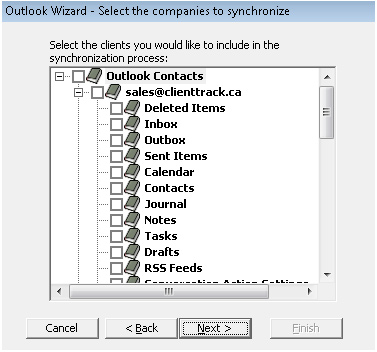
| 1) Check off the contacts you want to synchronize with and click . |
|
| 2) After synchronization is complete, save the scheme (optional) and click . |
|